NAOS Fitness — Member App
Product requirements · V1 · Engineering build spec
21 Sep 2026 · Written against the clickable prototype · Supersedes the Sep 2026 handoff spec where the two disagree
How to read this
Every screen shown here exists in the prototype and is the reference implementation: layout, copy, states and numbers are all real, and the fixture data is the contract for shapes, not for values. Where NAOS still owes a decision, section 8 names our recommendation and marks it Our call. Scope is the member app; coach and admin portal work appears only where the member app depends on it (section 7).
1 · Problem and goals
NAOS Fitness runs coach-measured benchmark assessments on the gym floor. Today those results live in a coach's spreadsheet: a member is told a number, forgets it, and has no reason to come back for the next assessment. The gym has a competitive esports brand and no competitive product.
The member app turns the assessment into a ranked season game. It carries three progression tracks that never merge — this is the rule every other requirement follows from.
| Track | Answers | Source | Moves | Resets |
|---|---|---|---|---|
| Fitness Rank | How good are you | Placement total from a coach assessment | Only on official assessment; can go down | Per season |
| Account Level | How long have you been here | XP from participation | Any time XP is awarded | Never |
| Achievements | What have you done | Badges from challenges and milestones | On unlock | Never |
Goals
- Make the assessment worth returning for. Rank only moves on re-assessment, so the assessment is the app's core event and the only thing that changes the hero number.
- Give the between-assessment weeks something live. Challenges are the only moving part between assessments; they pay XP and badges, never rank.
- Make standing legible at a glance. Tier, placement total, distance to next tier, season position — in that order, on Home.
- Make a member want to post it. The achievement card is a deliberate share artifact.
Non-goals for V1
Self-serve registration (invite-only, accounts created at the gym), payment capture, booking and scheduling, wearables and auto-tracking, team boards, weight-class segmentation, divisions I–IV, and the coach/admin portal itself.
Success signals
Re-assessment rate per season, share of members with at least one challenge claim per season, and leaderboard opens per member per week. These need instrumenting but no analytics spec is in scope for V1.
2 · Personas
| Persona | Context | What they need from V1 |
|---|---|---|
| Rhea · the ranked member Assessed, mid-season, trains 3×/week | Checks the app after sessions and after a coach posts a result. Competitive, reads numbers fast, screenshots her rank. | Home hero that answers "where am I", a season board, challenges to claim, and a share card. |
| The new invited member Account created at the gym, no scores yet | Gets an invite email, sets up on the spot or that evening, first assessment is already booked. | Frictionless invite → gamertag → welcome, then an honest empty state with the appointment as the hero. |
| Coach Mika Portal user, not an app user | Runs assessments, confirms challenge claims, sets season targets. | Nothing in the app — but every rank change and most XP in it originates from her actions (section 7). |
| Gym admin Portal user | Creates accounts, books assessment slots, closes seasons, resets gamertags. | Same: the member app is downstream of admin actions. |
3 · User flows
3.1 First run (invite-only)
Splash → Get started → Invite code → Set password → Choose gamertag → Welcome → Home (unassessed)
The invite email deep-links into Invite code with the six characters pre-filled; the member's full name resolves from the code so they can see the account is theirs. Gamertag is a required step with a live uniqueness check — it is the member's first act of ownership, so it gets a full screen. Welcome states what happens next (first assessment is already scheduled) and drops into Home.
3.2 First assessment and rank reveal (peak 1)
Push: "Placement results posted" → Placement results → Rank reveal → Home (assessed)
The notification is the entry point, not a thing to find in the app: tapping it lands on the reveal with the animation intact. Placement results counts up the five attribute scores, draws the radar, lands the placement total, overlays the coach's season target as a dashed outline, and adds the flat 500 XP for completing an assessment. It hands off to the full-screen rank reveal.
3.3 Between assessments: the challenge loop
Home active-challenge prompt → Challenges → Challenge detail → mark ready to claim → (coach confirms) → level-up toast → Level history
Three verification paths exist in the data model and the UI: coach-confirmed, self-attested, and evidence upload (stub upload, pending-review state). A challenge never moves rank.
3.4 Compare and share (peak 2)
Leaderboard → Competitor profile → Comparison → Achievement card → native share sheet
3.5 Season close
Push: "Season ending" → Season → (season closes) → Push: "Season 4 final standings" → Season (closed) → Season history
At close, standings are locked, the countdown is replaced by a locked-standings state, and the season drops into Season history on the Season screen. Season-end XP (flat 1,000) lands for any member with at least one assessment that season.
4 · Screen specs
Thirty screens, grouped by tab. The tab bar (Home · Challenges · Board · Me) shows on signed-in screens only. Device frame is 402 × 874.
4.1 First run — no tab bar
Splash
Purpose. App-launch screen. NF mark, wordmark, loading sliver.
Behaviour. Animates in over ~1.8s, then auto-advances to Get started (signed out) or Home (session restored). No controls, no back.
Edge. If a session restore fails, fall through to Get started rather than holding the splash.
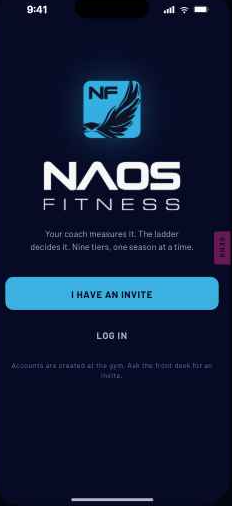
Get started
Purpose. Entry fork. Tagline, primary "I have an invite", secondary "Log in".
Behaviour. Copy states that accounts are created at the gym — there is no signup path to offer.
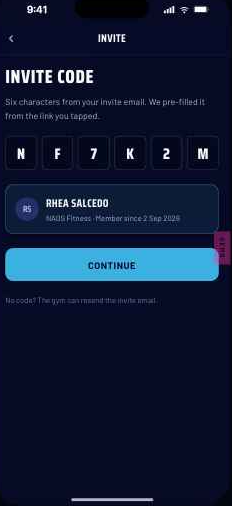
Invite code
Purpose. Six-character code entry, pre-filled from the email deep link.
Behaviour. Code resolves to the member's full name inline before Continue enables.
Edge. Unknown or expired code: "No invite matches that code. Ask the front desk to resend it." Codes are single-use.
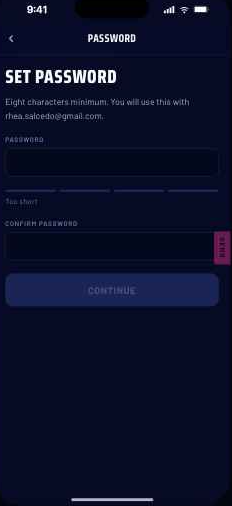
Set password
Purpose. Password and confirm with a strength meter.
Behaviour. Continue stays disabled until both match and the minimum strength is met; the rule is stated up front, never only on failure.
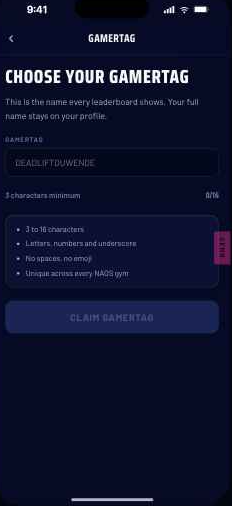
Choose gamertag
Purpose. Required. The name that appears on every board.
Rules. 3–16 characters, letters, numbers and underscore; unique database-wide (not per gym); live availability check as the member types, never submit-then-fail; re-checked on save.
Edge. Taken tag shows a taken state inline and blocks Continue. Admins can reset a gamertag from the portal.
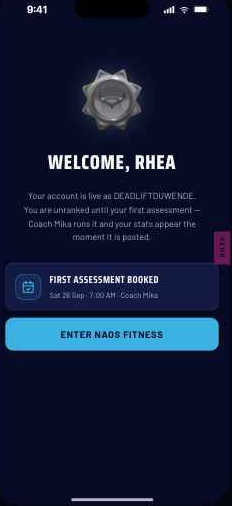
Welcome
Purpose. Confirms the account is live and sets expectations: the first assessment is scheduled, stats appear after it.
Behaviour. Single CTA into Home. The Iron badge is shown as unranked, not as a score.
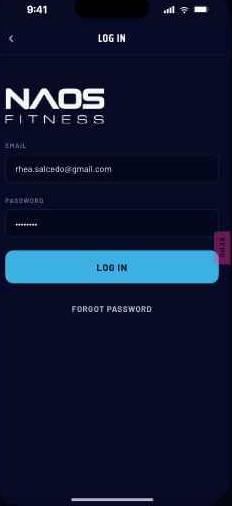
Log in
Purpose. Email and password, link to reset.
Edge. Wrong credentials return one combined message; never disclose whether an email exists.
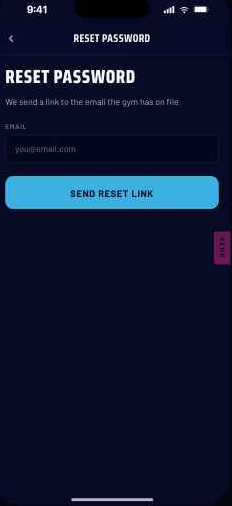
Reset password
Purpose. Email entry → send link → success confirmation → back to Log in.
Edge. Success copy is identical whether or not the email is known.
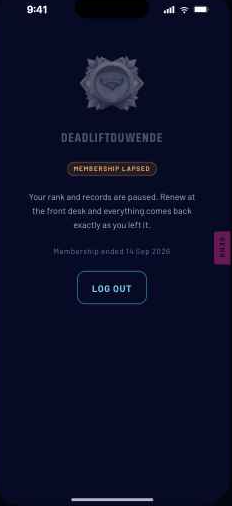
Membership lapsed
Purpose. Full block when membership ends. Rank badge and gamertag dimmed so it reads as paused, not deleted.
Behaviour. No tab bar, no back out, no payment path — renewal happens at the gym. Log out is the only action. Reachable from any screen when the membership flag flips.
4.2 Home and season
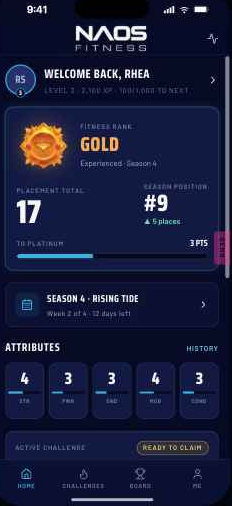
Home
Purpose. The standing, answered in one screen.
Elements. Greeting row with avatar level ring; Fitness Rank card (badge, tier, placement total, distance to next tier, season position); season row with week and days left; attribute strip of five axis scores; active challenge prompt; activity feed.
Behaviour. Rank card opens the Rank ladder; season row opens Season; any axis opens Attribute detail; the level ring opens Level history. Distance-to-next-tier is the progress metric, never a bar out of 45.
Edge. Unassessed: empty radar outline, Iron badge with no total, appointment card promoted to hero. At NAOS Legends: progress bar drops and the card reads tier · position.
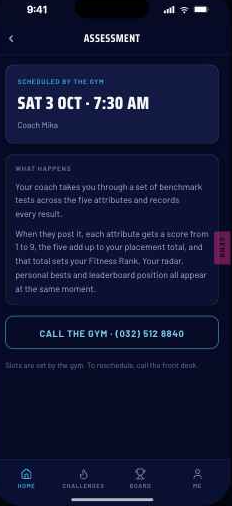
Assessment detail
Purpose. Read-only appointment set by the admin: coach, date, time, location, what to bring.
Behaviour. Secondary action requests a change, which notifies the coach. No booking, no calendar, no slot picking in V1.
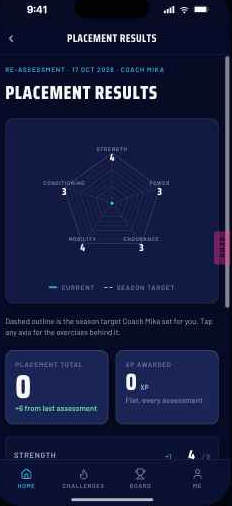
Placement results
Purpose. Peak 1. The coach's assessment, revealed.
Elements. Five attribute scores, radar animating in, placement total, resulting tier, the coach's season target as a dashed overlay with a one-line caption, and the +500 XP counting up.
Behaviour. Entered from the push notification; hands off to the rank reveal when the tier changes. Re-placements show movement against the previous assessment, including downward.
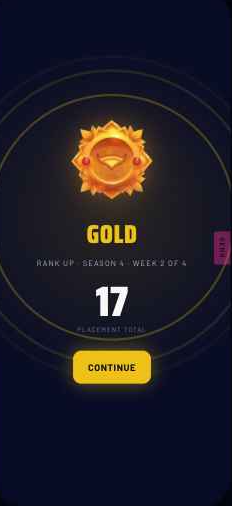
Rank reveal
Purpose. The one full-screen celebration in the product.
Behaviour. Fires on first placement and on any re-placement that changes tier. Tier name, medal, placement total, single continue CTA. Ordinary level-ups get a toast instead; milestone levels (10/20/30) get their own full-screen moment.
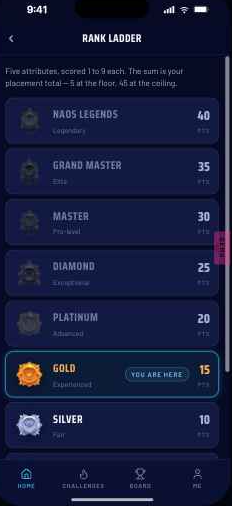
Rank ladder
Purpose. The whole climb: every tier, its threshold, and a "you are here" marker.
Behaviour. The only place the full 0–45 scale is shown. Above the top threshold the exact total is shown uncapped.
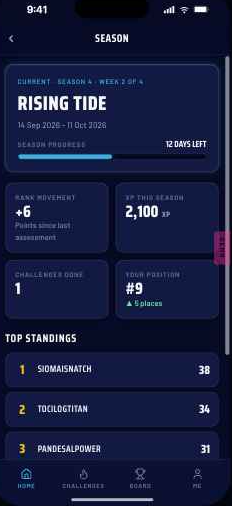
Season
Purpose. The season in one place: theme, dates, progress, the member's movement, and the top of the board.
Elements. Hero card with countdown; state notice (open / ending soon / closed); four stat tiles (rank movement, XP this season, challenges done, your position); top standings with a link to the full board; Season history of closed seasons.
Behaviour. Season history lives here and only here — Profile links to it rather than repeating it.
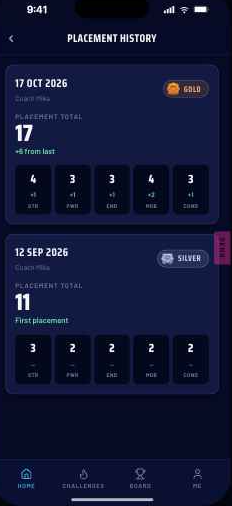
Placement history
Purpose. Progress over time: every assessment with date, per-attribute scores, total and tier, and the movement between them.
Edge. One assessment only: show it with no movement column rather than a comparison of one.
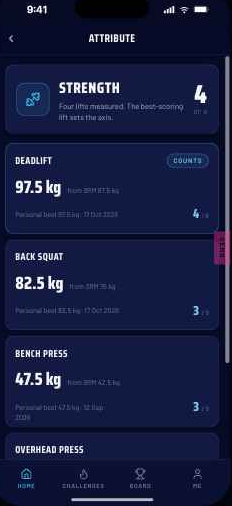
Attribute detail
Purpose. What produced the axis score: the underlying exercises, raw results with units, the 1–9 score each produced, personal best and date.
Behaviour. Reached by tapping any radar axis or strip tile. For Strength, all four lifts are listed with the best-scoring one marked as counting.
4.3 Challenges
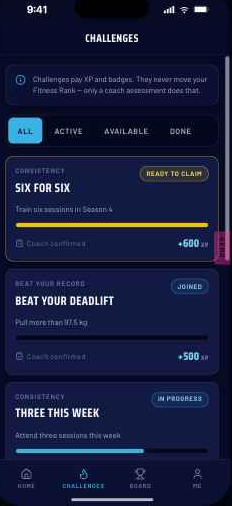
Challenges
Purpose. The between-assessment loop. Requirement, XP reward, progress, verification type and status per row.
Behaviour. Status filter across available / joined / in progress / ready to claim / pending review / completed.
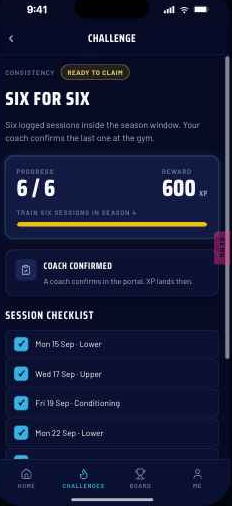
Challenge detail
Purpose. Category, description, XP, progress, session checklist where applicable, and the verification path for this challenge.
Behaviour. Coach-confirmed: member marks ready to claim, XP lands on the coach's confirmation. Self-attested: XP lands immediately. Evidence upload: stub picker, thumbnail, note field, pending-review state. Beat-your-record challenges display the current PR as the bar to beat and are always coach-confirmed.
Edge. Declined claim returns the challenge to in-progress with the coach's reason shown.
4.4 Board
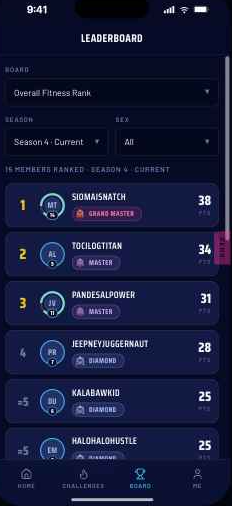
Leaderboard
Elements. Board selector (dropdown, Overall pinned first, per-exercise boards grouped by attribute), Season and Sex filters, count line, ranked rows: position, name per display setting, avatar with level ring, rank badge, ranking value. The member's row is highlighted and pinned into view.
Rules. Fewer than 2 entries hides the board. Sex defaults to All on Overall (bands are sex-specific); on per-exercise boards All is allowed but labelled as a mixed board.
Edge. Closed seasons show as a record: no movement indicators, no live position.
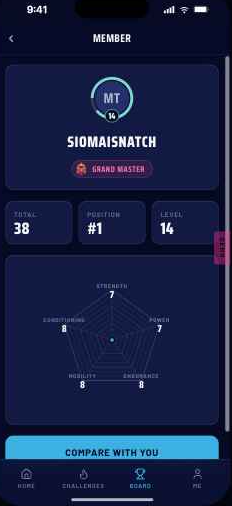
Competitor profile
Purpose. Opened from any leaderboard row: name per their display setting, level ring, rank badge, season position, placement total and radar.
Behaviour. Primary action is "Compare with you". No contact, no follow, no messaging in V1.
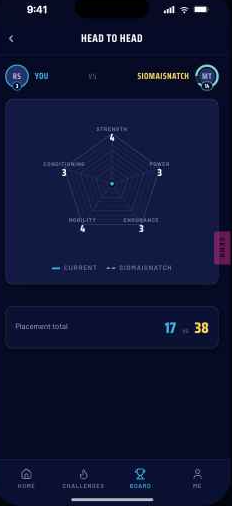
Comparison
Purpose. Two radars overlaid plus a per-attribute head-to-head delta and the totals.
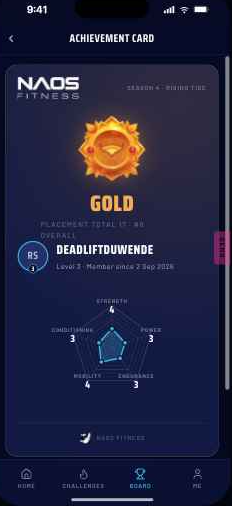
Achievement card
Purpose. Peak 2, and the product's only outbound artifact: medal, tier headline, name, gamertag, season, placement total, level and radar snapshot with a brand lockup.
Behaviour. CTA opens the native share sheet. Card renders at a fixed aspect so the exported image is predictable.
4.5 Me
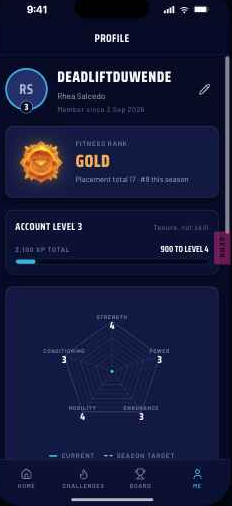
Profile
Elements. Avatar with level ring, gamertag, full name, Fitness Rank card, XP bar and level, radar with current and target, badge grid, settings list, log out, app version.
Behaviour. Settings list links to Edit profile, Membership, Season history (on the Season screen), Activity, About and legal, and Delete account.
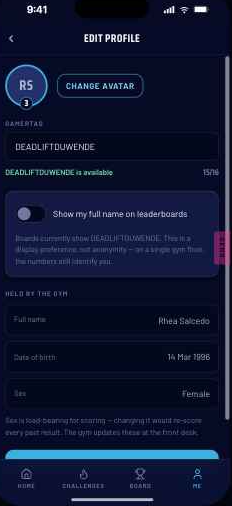
Edit profile
Purpose. Avatar, gamertag (same live uniqueness component as first run), and the leaderboard name toggle.
Rules. Full name, date of birth and sex are read-only with a line pointing to the gym — sex is load-bearing for scoring. The name toggle is a display preference, not privacy, and should be described to NAOS as such.
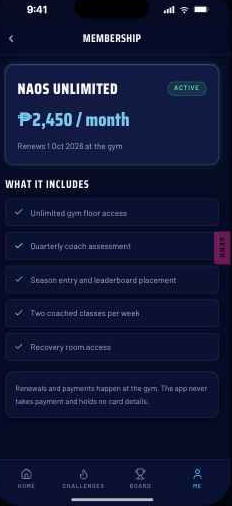
Membership
Purpose. Plan, price, status, renewal date and the benefit list. No payment method and no billing actions — renewal happens at the gym.
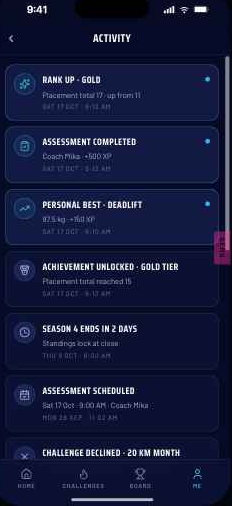
Activity
Purpose. The full in-app feed: assessments, rank changes, challenge events, level-ups, season events, each deep-linking to its target.
Edge. Unassessed members see one entry, account created — not an empty screen.
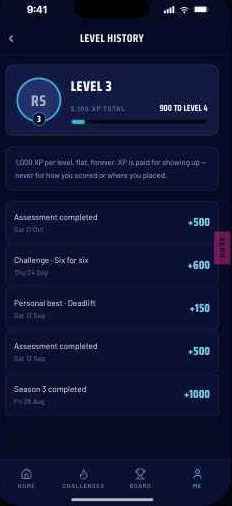
Level history
Purpose. Every XP award with source, amount and date, plus the current level and distance to the next.
Behaviour. Reached from the avatar ring anywhere it appears. Flat curve: 1,000 XP per level, forever.
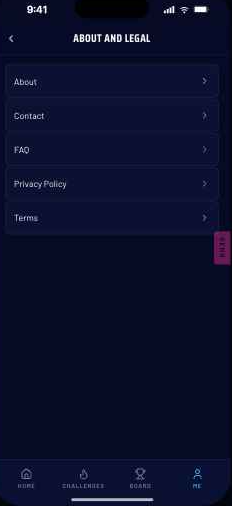
About and legal
Purpose. About, Contact, FAQ, Privacy Policy, Terms.
Dependency. Privacy Policy and Terms also need hosted public URLs for store submission.
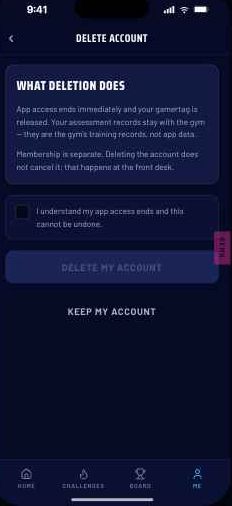
Delete account
Purpose. Required by both stores. Explains what deletion means when the gym holds the membership: app access ends, assessment records are retained by the gym.
Behaviour. Explicit confirmation step; the request is queued for the gym rather than executed client-side.
4.6 Not built in the prototype
Notification settings (per-category toggles for the eight push types) is specified but not yet drawn. It belongs in the Me settings list between Membership and Activity, and is a V1 requirement — both stores expect it and the notification set is large enough to annoy. Level-up toast and level milestone exist as fired moments rather than as standalone screens.
5 · States and edge cases
5.1 Member states
Five coherent states drive every screen; they are reachable from the demo panel and are the QA matrix.
| Unassessed | First placement | After challenge | After re-placement | Legends | |
|---|---|---|---|---|---|
| Fitness Rank | Iron, unranked | Silver | Silver | Gold | NAOS Legends |
| Placement total | — | 11 | 11 | 17 | 41 |
| Attributes | — | 3/2/2/2/2 | 3/2/2/2/2 | 4/3/3/4/3 | 9/8/8/8/8 |
| Level · XP | 1 · 0 | 1 · 500 | 2 · 1,100 | 3 · 2,100 | 12 · 11,400 |
| Position | Unranked | #14 | #14 | #9 (jump) | #3, position mode |
Invariants. Attribute scores drive the radar, the total and the tier together. The leaderboard recomputes positions from placement totals rather than hard-coding them. Personal bests and attribute detail derive from the same results as the radar. A challenge completion never changes rank.
5.2 Season states
| State | What changes |
|---|---|
| Day one | Week 1, full countdown, "Season open" notice, standings empty state, rank movement and XP reset to zero for the season, position unranked. |
| Live | Week n of m with days left; standings live; movement indicators shown. |
| Ending soon | Warning-toned notice ("standings lock when the season closes"), countdown at 2 days, assessment booking nudge. |
| Closed | Progress complete, "standings locked", final position stated, Ginto-toned notice, board CTA becomes "View final standings", season drops into Season history. |
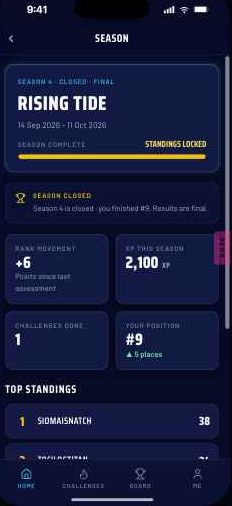
Left: live season, week 2 of 4. Right: closed season — locked standings, final position, and the history list below. No future dates are stated anywhere in season copy; the app has no source for them.
5.3 Other states to build
- Leaderboard density. Full, sparse (2–4 ranked, honest count line), and hidden (<2 entries).
- Challenge states. Available, joined, in progress with a count, ready to claim, pending review, completed, declined — across all three verification types.
- Membership lapsed. Blocks every screen from anywhere; log out is the only exit.
- Rank down. A re-placement can lower the tier. It does not celebrate: results show the movement, no reveal fires, and the copy stays factual.
- Offline and stale data. Last-known state renders with a quiet stale marker; no blocking spinner on Home.
- Deep links into missing content. A notification whose target no longer exists lands on the nearest parent screen with a one-line explanation, never a blank screen.
6 · Data model and rules
6.1 Entities
| Entity | Key fields | Notes |
|---|---|---|
| Member | id, fullName, gamertag, sex, dob, email, joinedAt, coachId, membershipStatus, displayNamePref, avatarUrl | fullName / dob / sex are admin-owned and read-only in the app. gamertag unique database-wide. |
| Assessment | id, memberId, coachId, date, scores[5], total, tier, targetScores[5], notes | Written by the portal only. Immutable once published; corrections create a new record. |
| ExerciseResult | id, assessmentId, exerciseId, attribute, rawValue, unit, score1to9, isPersonalBest | Feeds attribute detail, per-exercise boards and PR-based challenges. |
| Season | id, number, theme, startDate, endDate, weeks, status | status: upcoming · live · closed. Closing is a portal action. |
| SeasonEntry | seasonId, memberId, total, position, tier, movement | Position is derived from totals at read time, never stored as truth mid-season. |
| Challenge | id, title, category, requirement, goal, xp, verifyType, seasonId | verifyType: coach · self · evidence. |
| ChallengeClaim | id, challengeId, memberId, progress, status, evidenceUrl, reviewedBy, reviewedAt, declineReason | status mirrors the challenge states in 5.3. |
| XpEvent | id, memberId, source, amount, date, refId | Append-only ledger; level is derived, never stored. |
| Badge | id, memberId, badgeType, earnedAt, refId | Permanent; never revoked on a rank drop. |
| NotificationPref | memberId, category, enabled | One row per push category. |
6.2 Scoring and tiers
Five attributes — Strength, Power, Endurance, Mobility, Conditioning — each scored 1–9 against sex-specific bands and summed. Range 5–45. The total sets the tier; Iron is the pre-assessment state, so no assessed member lands in Iron.
| Tier | Label | Min total | Tier | Label | Min total |
|---|---|---|---|---|---|
| Iron | Newbie | 0 | Diamond | Exceptional | 25 |
| Bronze | Novice | 5 | Master | Pro-level | 30 |
| Silver | Fair | 10 | Grand Master | Elite | 35 |
| Gold | Experienced | 15 | NAOS Legends | Legendary | 40 |
| Platinum | Advanced | 20 |
Nine tiers, not eight. Nine medals were supplied, so Grand Master sits between Master and NAOS Legends and the bands run 5 points wide to 40. If NAOS confirms eight, delete Grand Master and reset the top band to 35.
Display rules. Home shows distance to the next tier ("3 pts to Platinum") plus the raw total with no denominator. The rank ladder is the only place the full 0–45 scale appears. At the top tier the app switches to position mode: the progress bar drops and the card reads tier · season position, with the uncapped total on the ladder.
6.3 XP economy
| Source | XP | Rule |
|---|---|---|
| Challenge completed | 200–600 | Set per challenge difficulty, never by member performance. |
| Assessment completed | 500 | Flat — same whether the member scored 12 or 38, up a tier or down one. |
| Season completed | 1,000 | Flat, for any member with at least one assessment that season. |
| Personal best set | 150 | Per exercise. |
Hard rules. XP never scales with score or position. Level never shares a container with Fitness Rank. One full-screen celebration only, and it belongs to rank-up. Nothing else attaches to XP — no unlocks, no gating, no rewards. These numbers need balancing against real training volume before launch.
6.4 Notifications
| Push | Trigger | Deep link |
|---|---|---|
| Placement results posted | Coach submits an assessment | Placement results, animation intact |
| Rank up | Tier advancement | Rank reveal |
| Level up | XP crosses a threshold | Level history |
| Challenge ready to claim | Member hits the requirement | Challenge detail |
| Challenge confirmed | Coach approves a claim | Level history |
| Assessment scheduled | Admin sets or changes the slot | Assessment detail |
| Season ending | Countdown milestone | Season |
| Season final standings | Season closes | Season (closed) |
Transactional email covers invite (with the deep-linking code), password reset and appointment scheduled. All push categories are individually toggleable.
7 · Coach and admin portal dependencies
The portal is a separate spec, but the member app cannot ship without these. Every one of them is a write the app never performs itself.
| Portal action | What breaks in the app without it |
|---|---|
| Create member account, send invite | No first run at all — registration is invite-only. |
| Publish an assessment (scores, total, season target) | Rank never moves; radar, ladder, history and both peaks stay empty. |
| Schedule or change an assessment slot | Appointment card and the unassessed Home hero have no content. |
| Confirm or decline a challenge claim | Coach-confirmed and evidence challenges can never complete; XP stalls. |
| Open and close a season | No season states, no final standings, no season history, no season XP. |
| Reset a gamertag | No remedy for an abusive or mistaken tag. |
| Update membership status | The lapsed block never fires. |
8 · Open decisions and risks
NAOS owns these. Each carries our recommendation, which the prototype already assumes — build against it and keep the seam visible.
| Decision | Our call | Where it bites |
|---|---|---|
| Exercise list: workbook nine plus body fat, or the agreed eleven | Workbook list. Ship the nine, add later without a schema change. | Number of per-exercise boards and attribute detail rows |
| Body fat: scored or not, visible to whom | Record it, show member and coach, exclude from the total and from public boards. | Total range, tier thresholds, board count |
| Explosiveness combination rule | Best of the two exercises. Matches how Strength already resolves. | Attribute detail for Power |
| 3RM → 1RM estimation | Coach enters 3RM, the system estimates. Keeps floor work fast and the maths consistent. | Attribute detail for Strength |
| Between-band results | Round down. A band is earned, not approached. | Fixture scores only |
| Divisions I–IV | Drop for V1, keep the component API. Five point values per tier does not map to four divisions. | Rank badge, ladder, Home card |
| Challenge verification | Ship coach-confirmed and evidence upload; hold self-attested for a later release. Self-attested is free to build and impossible to trust, and rank-adjacent trust is the whole product. | Challenge detail, coach workload, review queue |
| Season length and carry-over | Four weeks, nothing carries. | Season screen, history, season XP |
| Eight tiers or nine | Nine — nine medals exist and Grand Master fills the 35 band. | Ladder, thresholds, badge art |
| Registration model | Invite-only. Confirm before build starts — reversing adds a signup screen, DOB and sex entry, and turns Membership into a paywall. | First run, Membership, store review |
Risks
- The engagement gap. Rank, PRs and the radar are all static between assessments; challenges carry the whole loop alone. If challenge verification lands late, the app is quiet for weeks at a time.
- Thin boards at launch. One gym, many boards across two filter dimensions. The <2-entry rule and the honest count line are the mitigation; watch it in the first season.
- Coach workload is the real dependency. Every rank change and most XP originates in the portal. Under-staffed confirmation makes the member app look broken.
- Display-name toggle is not privacy. On a small member base the top of a board is identifiable regardless. Say this to NAOS explicitly; real privacy is a different feature.
- Numbers are unbalanced. Tier thresholds, XP per level and challenge rewards are illustrative until measured against real training volume.
9 · Build hygiene
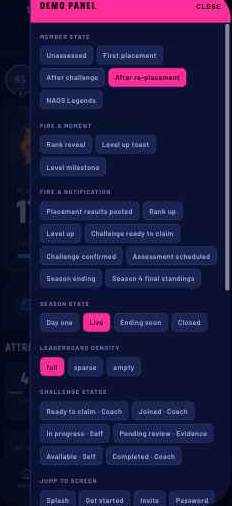
Demo panel. Prototype-only control surface: jump to screen, member state, season state, fire a moment, fire a notification, leaderboard density, display-name toggle, membership status, reset. Shake to open, with a deliberately off-brand magenta handle as the visible fallback. It ships in the App Distribution and TestFlight builds and must be strippable: one folder, one mount point behind a build-time flag, no inbound imports, state changes only through real app actions. Acceptance test: deleting the folder and the single mount line leaves a working app.
App version display. Profile shows Version 1.0.0 · Build 24. The build suffix is for dev, staging and tester builds only — production releases must render the version alone (Version 1.0.0). The string is built in one place in the profile view model; strip the suffix there behind the same release flag that strips the demo panel.
Platform pass. The system is iOS-derived. Android needs its own treatment for the back button, share sheet, system font fallback and navigation transitions. Do not assume pixel parity.